Upgrade Your Business in 3 Steps, Starting This Week

The short answer
To upgrade your business, start with clarity rather than software. Map one workflow that feels slow, end to end. Remove two or three friction points you can see on that map. Then decide where existing tools or custom software multiply what already works. Clean first, automate second, build custom when the return is obvious.
Upgrade Your Business Before You Buy Any Software
Most business owners hear the word “modernisation” and instantly imagine new software, big budgets, and a consultant named Paul who says things like “digital transformation” and “change management” while pointing at a very colourful PowerPoint.
Let’s take Paul out of the equation. You can upgrade your business without him.
Upgrading your business is not about buying more tools. It is about removing the friction your team deals with every day but never talks about because “that is just how we have always done it.”
Operational inefficiency drains revenue quietly, because nobody invoices for it. McKinsey’s 2017 report on automation put a number on the scale of it: around 45% of the activities people are paid to do could already be automated with the technology available at the time. You do not have to automate any of that today. You have to be able to see it first.
Before new tools. Before custom systems. Before anything complicated.
You start with clarity.
Here is the 3-step plan you can run this week to upgrade your business. No tech background required.
Step 1: Map One Workflow That Feels Slow
Time required: 30 to 45 minutes
Pick one workflow that annoys your team or takes longer than it should. Do not map your whole business. Just one.
Examples include onboarding, follow-ups, reporting, vendor coordination, scheduling, or anything that seems to involve three spreadsheets, and at least one person whispering “why is my screen frozen”.
Use Zapier’s simple workflow mapping approach to lay out the steps. Their guide explains that every workflow is just a sequence of triggers, actions, tools, and outcomes.
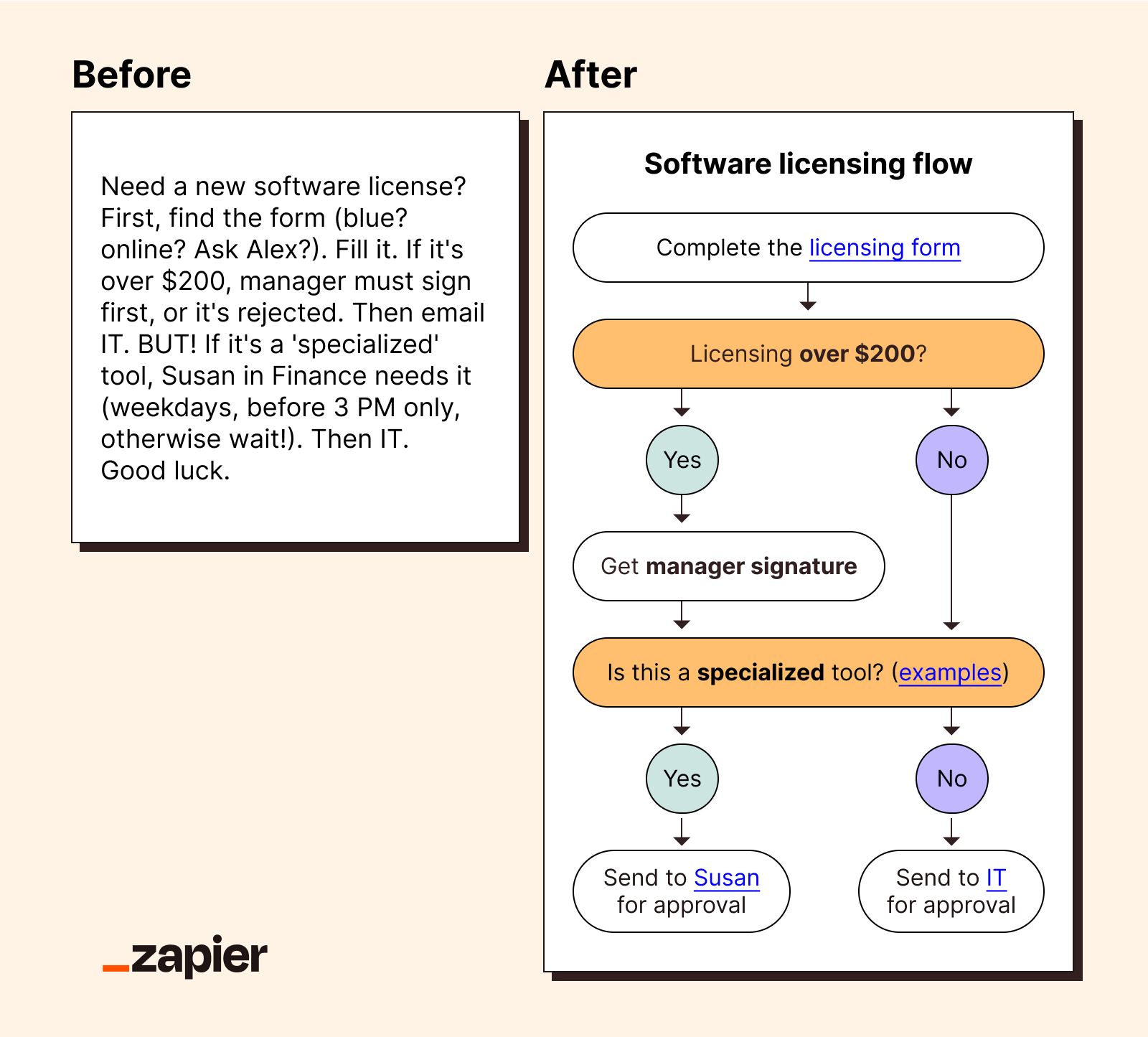
https://zapier.com/blog/visual-workflow/
Write it like this:
What starts the workflow
Each action taken
Every tool used
Every handoff between people
The final outcome
As soon as this list is on paper, you will start to see the problems.
Duplicated steps.
Manual data entry.
Tools nobody needs.
People waiting on other people.
Confusing approval loops.
Great workflows make sense. Messy workflows need to go.
Step 2: Remove Two Or Three Friction Points
Time required: 1 to 2 hours across the week
You now have a full map of the workflow. This is where many people panic and think, “We have to rebuild everything.” No, you don’t. You pick two or three friction points and remove them.
Small fixes create big wins.
Deloitte’s public insights consistently highlight that businesses generate the highest ROI when they target specific friction points rather than trying to replace entire systems at once.
Here are some common friction points and their simple fixes:
Friction Point 1: Customers drop off while filling in your form
Fix: Split form into two steps or add a progress indicator
Shopify’s UX writing guide explains how clarity reduces drop-offs
Friction Point 2: Your team enters the same data into multiple tools
Fix: Add a simple automation using Zapier, Make, or your CRM
Friction Point 3: Approvals stall
Fix: Create a shared approval board or add a dedicated rule in your inbox
Friction Point 4: Clients ask the same questions
Fix: Create a mini FAQ or micro-guide
This aligns with Shopify’s UX thinking around reducing cognitive load
Friction Point 5: Staff forget recurring tasks
Fix: Build a reusable checklist in Notion, Asana, or ClickUp
Small points of friction create disproportionate frustration. Eliminate it and everything downstream moves faster.

Step 3: Decide Where Tools Or Custom Software Can Multiply The Impact
Once the workflow is clean, technology becomes your multiplier.
This is where existing tools or custom software finally make sense. Not because they add features but because they scale what works clearly and consistently.
Forrester notes that digital investments deliver the highest returns when they align to simplified, stable workflows rather than chaotic ones.
Here is how to decide what to use:
When existing tools are enough:
• The workflow is simple
• You only need basic automation
• Your team already uses tools like HubSpot, Monday, ClickUp, or a CRM
• You mostly need better visibility and consistency
When custom software is the smart investment:
• Your workflow has unique steps standard tools cannot handle
• You use five or more tools to complete one process
• Your team spends valuable time patching data together
• You want your workflow to scale across locations or departments
• You want custom dashboards that reflect exactly how your operations run
• You want long-term automation based on your own unique business logic
If you cannot tell which side of that line you are on, the product readiness assessment is a quick way to get a read on it.
At Rigoris, we frame it this way.
Clean first. Automate second. Build custom when the ROI is obvious. You can see the shape of that on our services page, where scope comes before anything gets built.
Technology is powerful, but only when pointed at a clear target.

Upgrading Your Business Is A Habit, Not A Project
If you complete these three steps this week:
• Map one workflow
• Remove friction
• Decide where tech amplifies the impact
You have already upgraded how your business works.
You will start to see fewer delays, fewer customer drop-offs, your business will feel more predictable.
And the best part:
You did it without buying another tool or rebuilding your entire system.
When one of those workflows does justify a build, the next thing to get right is the contract. We wrote about what actually protects you from scope creep there.

Common questions
It means removing the friction your team works around every day, not buying more tools. Most of the gain comes from seeing one workflow clearly and cutting the duplicated steps, manual re-entry and stalled approvals inside it. Tools come after that, not before.
You can run all three steps in a week. Mapping one workflow takes 30 to 45 minutes. Removing two or three friction points takes one to two hours spread across the week. Deciding where technology helps takes a conversation, not a project.
Usually not at first. If the workflow itself is messy, new software copies the mess and charges you for it. Clean the workflow, then automate the parts that repeat, then build custom only where the return is obvious.
When your workflow has steps standard tools cannot handle, when it takes five or more tools to finish one process, when your team spends real time patching data between them, or when you need the workflow to scale across locations or departments on your own business logic.
More Posts
Why Legacy Companies Fall Behind in the AI Era
Legacy companies don't fall behind on AI because of the tools. They fall behind on operational clarity. What behind actually means, and what to fix first.
Next post ›How to Write a Feature Request That Actually Gets Built
Most feature requests get ignored because they skip the why. Here is what to include so a product manager can understand the problem and prioritize it.